Request a demo
AI presentation generation

Turn a brief and your brand template into a finished deck in minutes.

Describe the presentation or drop in your documents. InsightSlides plans the story, writes every slide, draws the diagrams and lays it all out in your template, then opens the deck in an editor so you can refine each slide before you export.

  • AI writes every slide
  • Your PowerPoint templates
  • Native diagrams
  • PowerPoint, PDF, Google Slides
InsightSlides · WorkbenchDemo data
A generated quarterly operations review for a made-up freight company open in the InsightSlides workbench: the slide navigator lists each slide with its type, and slide 3 shows a process diagram from order received to delivered, with an exception loop.
What you bring in and what you take away
A plain-language briefYour documentsYour .pptx template PowerPoint (.pptx)PowerPoint with editable diagramsPDFGoogle Slides
How it works

From brief to deck in five stages

Press Generate and an AI pipeline plans, writes, draws, assembles and checks the deck, logging each stage so you can watch it progress. Then the deck is yours to edit.

  1. 1Planner

    Plan the story

    Turns your brief, slide count and tone into an outline: one topic per slide, in order.

  2. 2Content generator

    Write every slide

    Writes the title, body and speaker notes for each slide in the tone you chose.

  3. 3Diagram generator

    Draw the diagrams

    Where a slide calls for a process, timeline or structure, writes a Mermaid diagram in your template's colours.

  4. 4Slide assembler

    Lay it out

    Picks a layout for each slide from your template and places the text, diagrams and elements.

  5. 5Quality checker

    Check the result

    Reviews the assembled deck for gaps before it opens in the workbench.

Where people stay in charge

The AI drafts; you decide what gets presented

You set the brief. The description, the number of slides, the tone (professional, casual, academic or creative) and the template are yours to choose.

Every slide is editable. The deck opens in the workbench: reorder, rewrite, change layouts and diagrams before anyone sees it.

You choose when it ships. Nothing leaves InsightSlides until you export it to PowerPoint, PDF or Google Slides.

Product tour

Brief, workbench, template, export

Four screens carry a deck from an idea to a file you present.

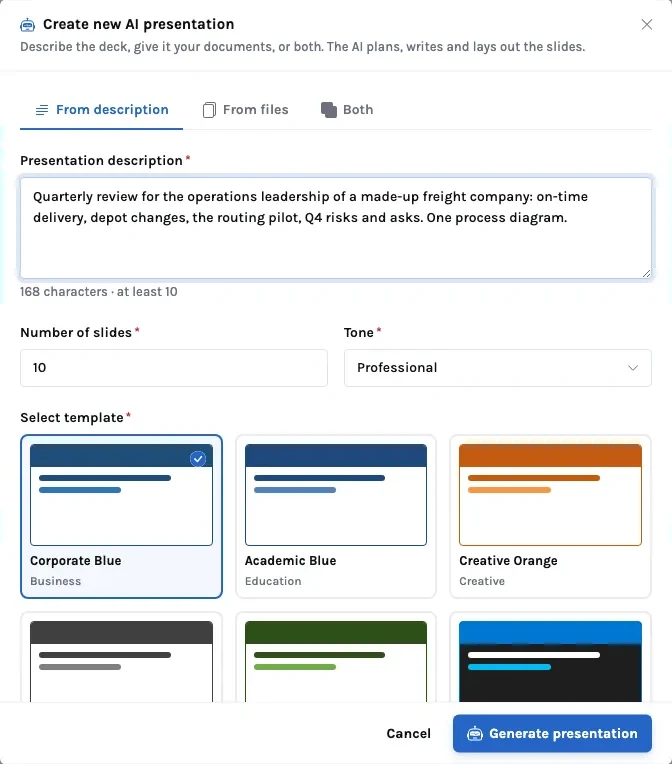
1 · The brief

Describe the deck, give it your documents, or both

Write what the presentation is for and who will see it, or attach source documents and sample slides. Choose the number of slides, a tone and a template, then press Generate.

You decide

  • What the deck must say
  • Slide count and tone
  • Which template

AI prepares

  • The outline
  • Every slide's content
  • Speaker notes
Create new AI presentationDemo data
The Create new AI presentation form: tabs for From description, From files and Both; a description of a quarterly review for a made-up freight company; 10 slides; a Professional tone; and template choices Corporate Blue, Academic Blue and Creative Orange.
2 · The workbench

Refine every slide in one editor

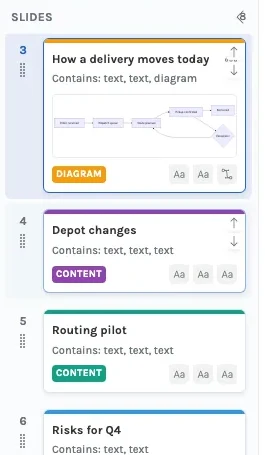
The navigator lists every slide with its type and contents. Drag to reorder, duplicate or delete; switch a slide between title, content, two-column, comparison, image-focus and blank layouts; add text, images, charts, diagrams, tables and shapes; edit speaker notes; and preview the deck as a slideshow.

You decide

  • The order and the story
  • Every word on the slide

AI prepares

  • A first draft of every slide
  • Diagrams from a description
Slide navigatorDemo data
The workbench slide navigator for a made-up quarterly review: slides for a delivery process diagram, depot changes, a routing pilot, Q4 risks, asks and next steps, each tagged with its type.
3 · Templates

Six built-in designs, or upload your own PowerPoint template

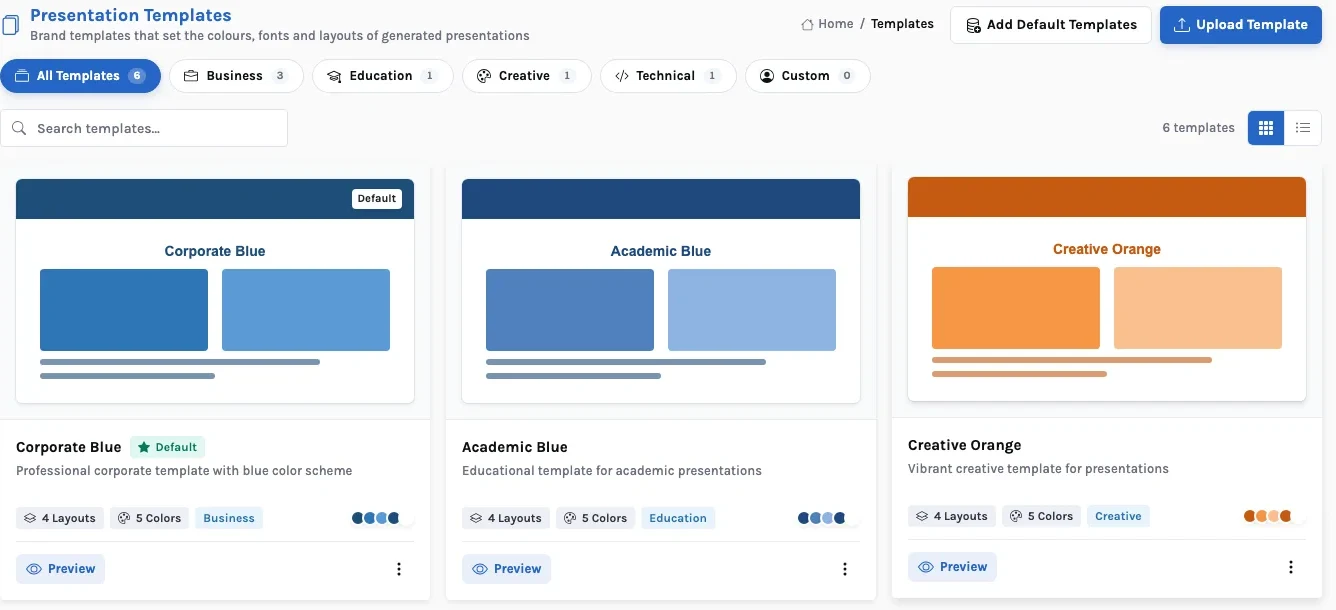
Templates set the colours, fonts and layouts of a generated deck. Start from Corporate Blue, Academic Blue, Creative Orange, Minimal Gray, Modern Green or Tech Dark, or upload a .pptx and InsightSlides reads its layouts and fonts.

You decide

  • Your organisation's default
  • Which template each deck uses

InsightSlides prepares

  • Layouts read from your .pptx
  • Diagrams in the template colours
Presentation templates
The Presentation Templates page: category filters for Business, Education, Creative, Technical and Custom, Add Default Templates and Upload Template buttons, and the Corporate Blue, Academic Blue and Creative Orange templates with their layouts and colours.
4 · Export

Present it anywhere

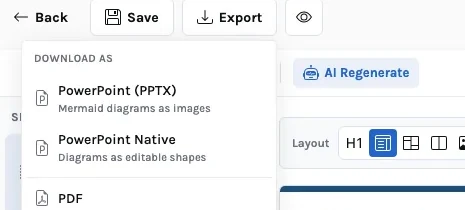
Export to PowerPoint with diagrams as images, or as PowerPoint Native with diagrams as editable shapes you can change in PowerPoint. Or export to PDF or Google Slides.

You decide

  • The format
  • When the deck leaves

You get

  • PowerPoint (.pptx)
  • PDF and Google Slides
Export
The workbench Export menu: PowerPoint (PPTX) with Mermaid diagrams as images, PowerPoint Native with diagrams as editable shapes, and PDF.
Capabilities

Everything between a blank page and the meeting

Generation, editing, brand and export in one place, so a deck does not bounce between five tools.

  • AI-powered generation

    Create a professional presentation from a description: AI plans the story and writes every slide.

  • Start from your documents

    Generate from a description, from files, or both; source documents and sample decks stay attached to the presentation.

  • Professional templates

    Choose from six built-in templates or upload your own .pptx designs; set a default for everyone.

  • Tone and length

    Professional, casual, academic or creative, at the number of slides you ask for.

  • Native diagrams

    Flowcharts, sequences, timelines and more as Mermaid code: describe one, edit the code, preview it on the slide.

  • Workbench editor

    Layouts, elements, backgrounds and an inspect view of each slide, with autosave and keyboard shortcuts.

  • Speaker notes and slideshow

    Every generated slide comes with notes; preview the deck full screen with notes shown or hidden.

  • Multiple export formats

    PowerPoint, PowerPoint Native with editable diagrams, PDF and Google Slides.

Use cases

The decks teams make every week

Worked examples with made-up companies, from the brief to the exported file.

Operations

A quarterly operations review

From a one-paragraph brief to an eight-slide leadership review with a process diagram, finished in the workbench.

Read the example
People teams

A first-week onboarding deck

A friendly deck in a casual tone for new staff, with a first-week timeline and notes for the person presenting it.

Read the example
Brand

Decks on your own template

Upload the company .pptx once, make it the default, and every new deck starts in your layouts and fonts.

How templates work
Security & deployment

Runs in your environment, behind your sign-in

InsightSlides runs on the Insight platform: your database, your identity provider, your cloud.

Inside your environment

Deploys in your cloud accounts (AWS, Google Cloud, Azure) or on premises. Decks, templates and uploaded files live in your own Postgres database.

Sign-in and roles

Every route needs a signed-in user. Users, roles and API keys are managed in the product, with optional Okta (OIDC) single sign-on.

Audit and progress logs

An audit trail of sign-ins and changes, and a log of every generation stage for each deck.

Ready to create your next presentation?

Join thousands of professionals who are already using InsightSlides. Bring the brief for a deck you have to give; we will generate it with you and refine it in the workbench.